

Last updated on April 15th, 2025 at 01:44 pm
Transitions have become a powerful tool in the world of short-form video content, especially on platforms like TikTok and Instagram Reels. Over time, they have transformed from a creative choice into an essential strategy for content creators looking to boost engagement and maximize views across social media platforms. These transitions, when executed well, provide a visually captivating experience that holds the viewer’s attention, preventing them from scrolling away too soon.
The rise of transitions is more than just a trend. It’s a way to cater to the modern viewer’s desire for dynamic and visually stimulating content. In today’s fast-paced digital landscape, where attention spans are shorter than ever, transitions play a crucial role in keeping viewers engaged. By creating seamless or unexpected shifts between scenes, you can heighten the sensory appeal of your content, making it more memorable and shareable.
This article will teach you how to use the TikTok app to create transitions on your devices. We offer a complete guide from learning transitions to creating trending transitions that attract engagement. Additionally, we teach you features of TikTok that give you access to pre-made transition effects so you can make more natural transitions while recording your video.
How To Do Trending TikTok Transitions
-
Using Built-In Transition Effects
1. Record or Select Your Video:
- On the TikTok app, press the “+” sign located in the center of the homepage to either select or record your video.

- Choose the desired length for your video (15 seconds, 60 seconds, or 10 minutes), then press the red recording button. To create a segmented video, press the red button again to pause the recording, and press it once more to resume.

- If you are working with pre-recorded footage, tap the Gallery icon located to the right of the record button to select a video from your device.

-
2. Access and Apply Transition Effects:
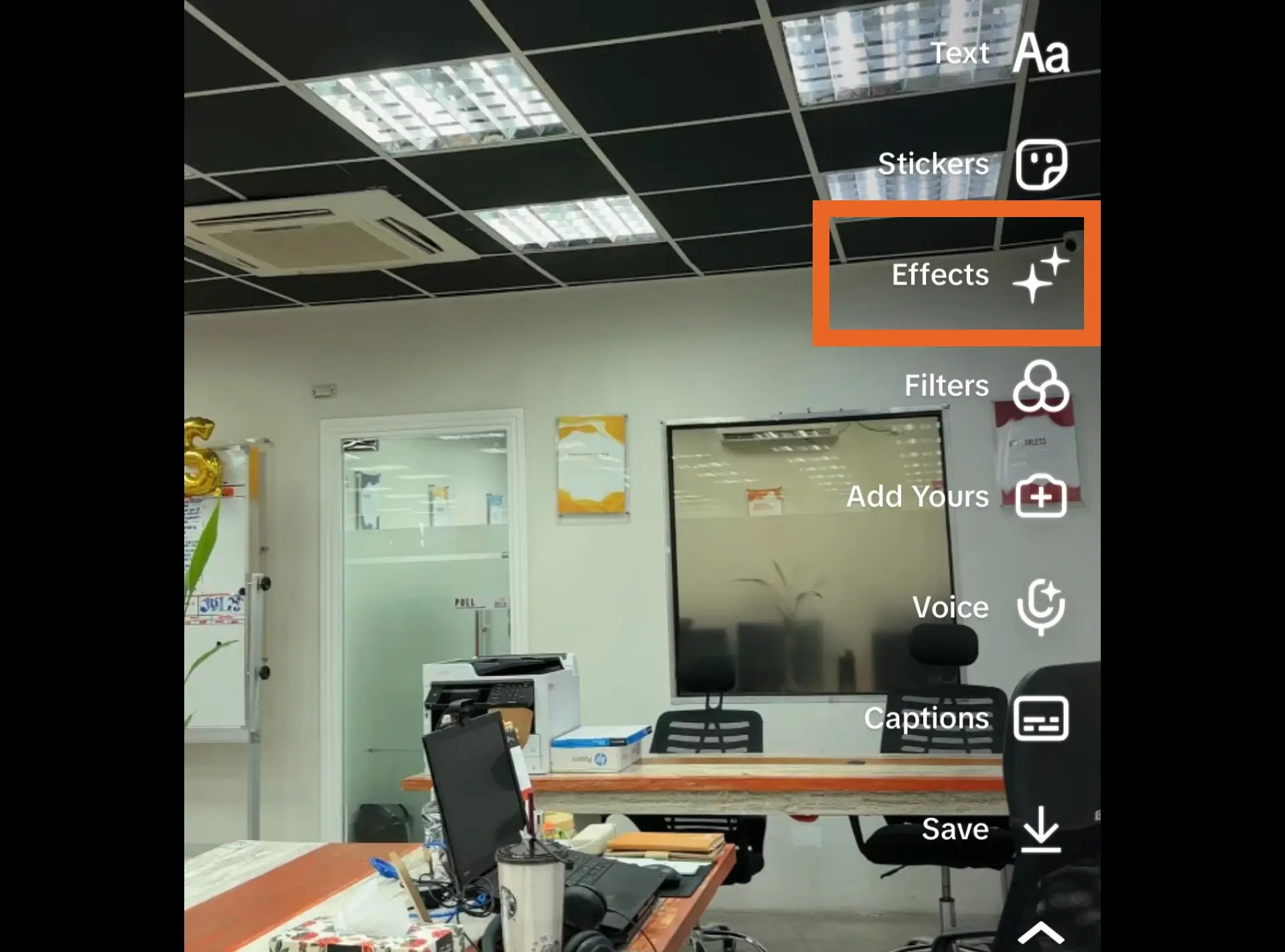
- Once you have finished recording or selecting your video, tap the “Effects” icon (represented by a sparkly icon) on the right side of the screen.
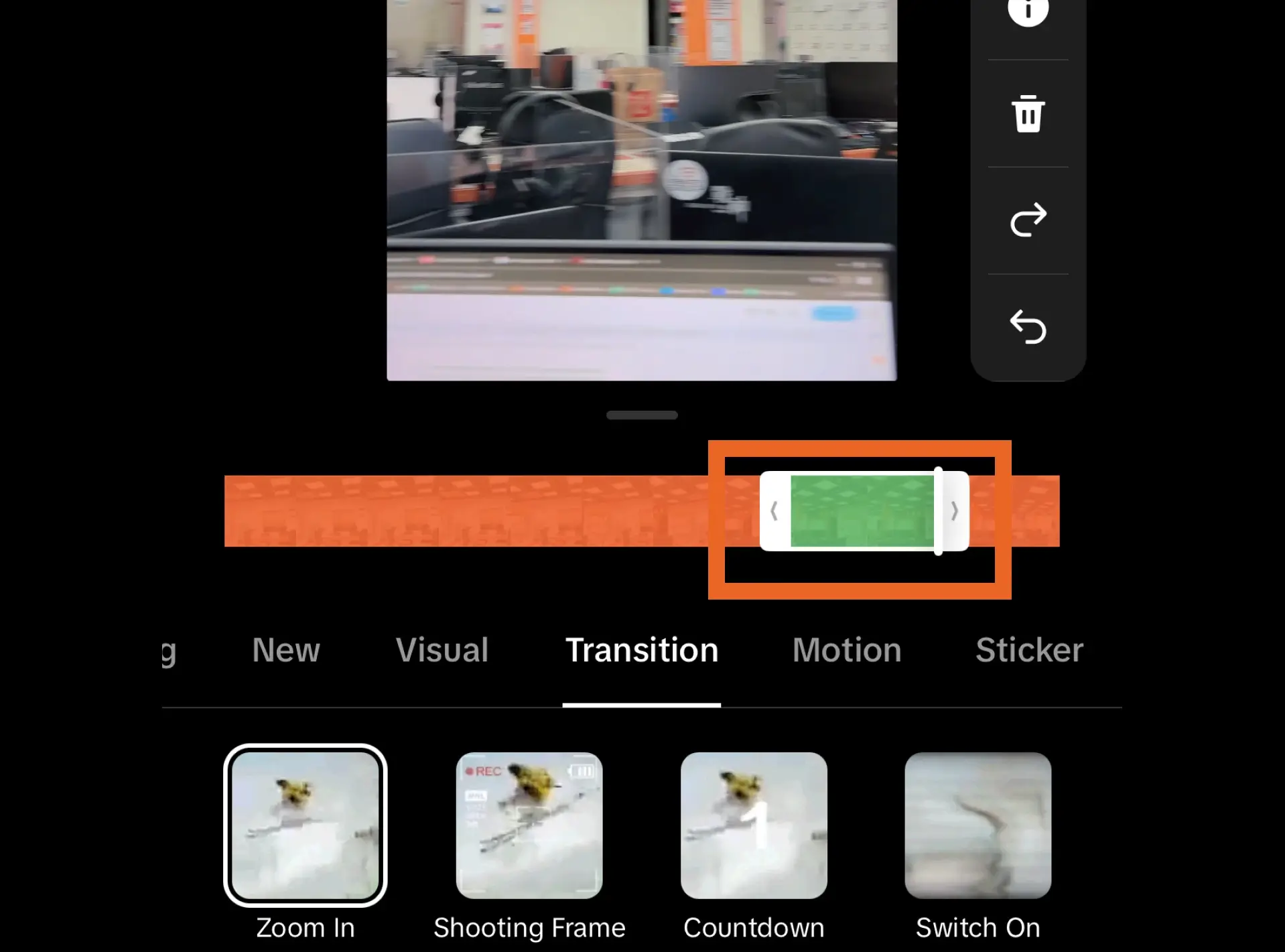
- Navigate to the “Transition” tab located at the bottom of the screen to view available transitions.

- Drag the marker along the video timeline where you want to insert a transition.
- Select a transition by tapping it; a green highlight will appear on the timeline, indicating where the effect will begin. You can adjust this by dragging the green highlight to refine the transition's starting and ending points.
- In the same window, you can explore additional effects to enhance the video’s visual appeal further. These options can help you create a more engaging and dynamic presentation.
-
3. Save and Post:
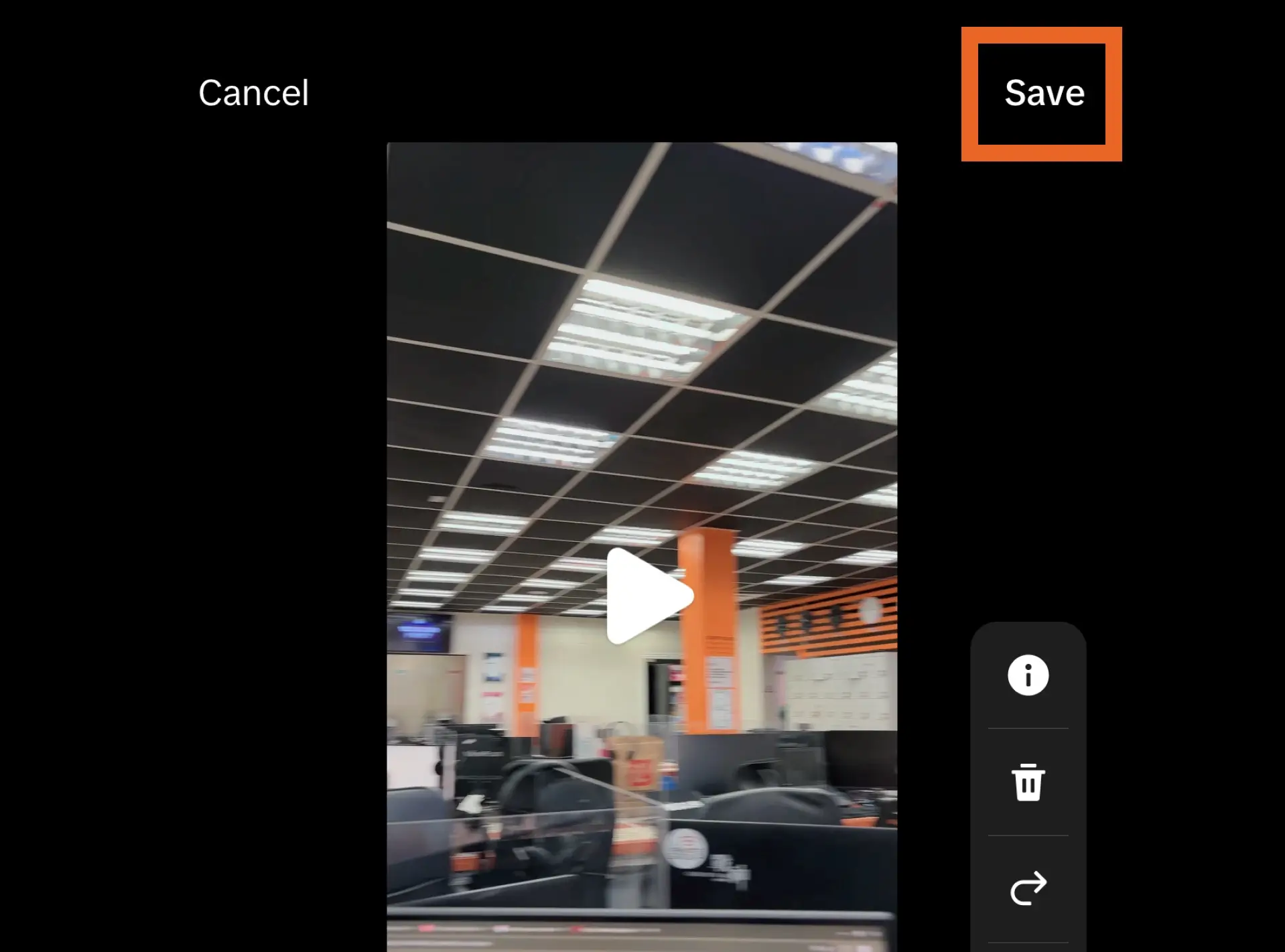
- Once you're satisfied with your edits, tap “Save” in the top-right corner.
- Click “Next” on the bottom-right corner to proceed. Add a compelling caption to captivate your audience, and then publish your video by tapping “Post.”

-
Creating Custom Transitions
1. Strategize Each Clip:
- If you are new to this concept, it’s best to explore transition techniques by browsing TikTok or other platforms like YouTube for inspiration. Observing how other creators execute smooth transitions can spark new ideas and help refine your approach.
- Plan the transition carefully by considering how each video clip will start and end. The key is to ensure that the transition flows naturally between clips. To achieve this, end the first video with an action that can be mirrored or continued at the start of the second video.
-
2. Executing the Transition:
- Once your transition is planned, start filming the first clip and perform the transition action (such as a spin, swipe, or camera movement) as you end the recording.
- Stop recording at the desired point, and when you're ready to film the next clip, resume the same transition action from the end of the first clip to ensure continuity.
- For example, if you plan to use a spinning transition, twirl your phone at the end of the first video, then stop recording. Begin the second video by continuing the twirl at the same pace and angle, creating a seamless spinning effect between clips.
-
3. Enhancing your Video:
- You can still add effects to your clips once you have finished recording by following the same principle as when you’re using built-in transitions.
- The effects can be applied alongside transitions, ensuring a smooth and cohesive final product. You can layer effects in specific sections to highlight or accentuate certain parts of your video.
Top Trending Custom TikTok Transition Videos for 2024 You Can Try
-
1. Hand Swipe
- Start by recording the subjects while they remain still.
- Swipe your hand in front of the camera until the entire screen is covered, then stop recording.
- Replace the original subject with something else, change locations, or introduce anything that will captivate and surprise your audience.
- Resume recording with your hand still covering the camera.
- Swipe your hand up (or in any direction opposite to your initial swipe) to reveal the new scene or subject.
- If you want to edit the video to make it smoother, you can do so on TikTok and apply any transitions or effects to enhance the overall look.
-
2. To The Side
@stylasocials You asked for another, I provided 🤳🏼❤️🔥 #contentcreatortips #newtrend #trendalert #tiktokcontentcreator #smallbusinestips #videotips ♬
- Switch your camera to selfie mode and glide your phone to the side of your head.
- Pause the recording and change your hairstyle, outfit, accessories, or anything else you'd like to showcase.
- Resume recording, but this time, bring your phone to the other side of your head to reveal the new look.
- Finally, position the camera back to the front of your face.
-
3. Finger Snap
@tonyun_ 不工作了 去日本🇯🇵🌝 Inst:_tonyun #transition #japan #travel ♬ Run Free (Original Mix) - Deep Chills
- Start recording the first part of your video, positioning the scene as desired.
- As the person behind the camera, position your hand so your fingers are visible in the camera's view. If you have help, have them hold the camera so that you're fully visible in the video.
- Snap your fingers, and as you reach the middle of the snap, pause the recording.
- Alter the scene by changing the subject, location, or other elements you want to showcase.
- Continue recording by mimicking the end of the snap, creating the illusion that the scene has changed in sync with the snap.
- Finish the video by revealing the new scene in full view.
-
4. Over the Head
@sabrinaannesocials Idk its just the way my brain works! Here’s a tutorial on the “over the head” transition! I hope this is helpful❤️🔥💖🧸 #transitionhelpline #creator ♬ original sound - Sabrina Anne
- Begin with your phone held upright, then slowly tilt it upside down.
- Glide your phone closer to the top of your head, then stop recording.
- Turn your phone back to the upright position, bring it to the front, just above your head, and resume recording.
- End the video at the same spot where you started, ensuring a seamless loop.
- You can adjust the movement of your phone in creative ways as long as it maintains a smooth and fluid transition between the clips. This will keep the visual flow intact, resulting in a polished final video.
-
5. Close Up
@stylasocials Another FIRE remix 🔥 New trend? 👀 #contentcreatortips #newtrend #trendalert #tiktokcontentcreator #smallbusinesstips #transitiontutorial #videotips ♬ original sound - Ian Asher
- If you are recording yourself, use your front camera. If you are filming something else, use the back camera.
- Push the camera toward the subject, and once you’ve found a good angle to cover the scene, stop recording.
- Resume recording as you pull away, changing the scene as needed.
- Continue pushing and pulling until you’ve captured everything you want.
-
6. Head Push
@mizmaxie_ Another easy transition #transitiontutorial #headtransitiontutorial #easytransition #transition ♬ the bob for me - aqyila
- Set your camera to selfie mode and get comfortably close. Record when ready.
- Place your hand on your cheek, ensuring your elbow extends out of the frame.
- Slowly push your hand away from your cheek, moving it out of the shot.
- Pause the recording when your elbow starts to come into view.
- Take note of where your hand is positioned, as this will serve as the transition to the next scene.
- Change something in your appearance to mark the transition.
- Sit up straight again, positioning your arm where it was in the previous angle.
- Pull your arm away as you begin recording the next scene as if you’re setting something aside.
-
7. Variety of Transitions
@sydneyonsocials Here are a couple of easy transition ideas to incorporate into your videos 😆✨ make sure to save this for later and try them out 🤪 #tiktoktips #socialmediatips #contentcreator #ugccreator #creatortips #ugccontentcreator #content #contenttools #transition #transitiontutorial #transitionideas #transitionidea ♬ original sound - CorporateNatalie
- Begin by recording yourself engaging in the activity you plan to showcase.
- Wipe your fingers in front of the camera to create a “finger fan” illusion.
- Continue your activity and smoothly lower your body, setting the stage for the next transition.
- As you rise back up, make a noticeable change to your look or surroundings.
- Spin your phone around your head while changing something again, then return to your original position.
- Grab an item and drop it, transitioning to the next scene with the camera on the floor.
- As you lean down to pick up your phone, tap the camera to switch to the back lens.
- End the scene in front of the mirror (or you in full view).
Benefits of Using Video Transitions for Your Business and Products
TikTok transitions can be a powerful marketing tool to captivate and entertain audiences. In an era where attention spans are fleeting, the ability to create visually dynamic and seamless transitions enhances brand storytelling.
By incorporating creative transitions into video content, brands can convey complex messages in a visually appealing way, making their marketing efforts more relatable and memorable. This approach showcases the brand’s personality and invites viewers to participate in a narrative that resonates with their own experiences.
Moreover, when done correctly, these transitions can set a brand apart from competitors. They allow for innovative content creation that breaks away from traditional marketing strategies, encouraging brands to explore new ways of engaging with their audience. This innovation can lead to increased brand awareness, customer loyalty, and, ultimately, conversion rates.
As TikTok grows in popularity, it has billions of TikTok users worldwide, with the United States having around 120.5 million of those users. Achieving the power of transitions can be a game changer for businesses looking to connect with a younger demographic. This platform offers unique opportunities for viral marketing, and brands that embrace creative transitions are more likely to capture the attention of potential customers.
In summary, TikTok transitions entertain and serve as a strategic tool for brand differentiation and audience engagement. By leveraging this dynamic medium, businesses can unlock new avenues for growth and redefine their marketing impact in a competitive landscape.
What are the common mistakes to avoid when doing TikTok transitions?
-
Abrupt, Sudden Scene Transitions
Instantaneous switch between transitions is a critical pitfall to avoid, as it can create a jarring experience for viewers. The essence of a successful transition video lies in delivering smooth and seamless shifts that enhance the overall narrative. When transitions are executed poorly, they can undermine the viewer’s engagement and derail the impact of the content. To impress your audience, focus on fluidity and coherence in your transitions, ensuring each change feels natural and contributes to a captivating viewing experience.
-
Overuse of Transitions
While transitions are a vital element of engaging videos, overusing them can be detrimental, especially if you’re using built-in transitions on TikTok and overlaying multiple effects, resulting in a distorted appearance that may overwhelm viewers. This can ultimately lead to visual clutter, making the video uncomfortable to watch and potentially causing audience fatigue or nausea. To maintain viewer interest and enhance the overall aesthetic, it's essential to use transitions judiciously, ensuring each one serves a purpose and contributes to a cohesive narrative. Aim for a balanced approach that captivates without overwhelming.
-
Awkward Cuts
Knowing when and how to cut is vital. Understanding the art of cutting creates impactful visual narratives as it can dictate pacing, influence mood, and guide audience focus. Grasping the rhythm of your content and the emotional beats can guide your editing choices, ensuring each cut serves a purpose. Mastering this skill can enhance your work, making it visually compelling and satisfying for your audience.
-
Shaky/Jittery camera handling
While shakes and jitters can be effectively used for transitions, natural hand movements can distract viewers and create an unnatural effect in your footage. Unintended shakes can create a sense of instability, making it difficult for viewers to fully engage with the content. This can lead to confusion or discomfort, ultimately pulling them away from the story you’re trying to tell. To maintain a professional appearance, stabilize your camera, whether using tripods, gimbals, phone holders, or other stabilization equipment. Smooth, controlled movements allow your audience to immerse themselves in the narrative without being jolted by shaky visuals. Additionally, employing techniques like editing software stabilization can help refine your footage in post-production.
-
Inconsistent Storytelling
Every story relies on consistency, and if a video lacks coherence, even the best transitions will fall flat. Inconsistent storytelling can make or break the narrative. Inconsistent elements—whether in tone, visuals, or messaging—can disrupt the viewer's understanding and engagement, making it hard for them to follow the intended storyline. Every aspect of the video should align with the overall theme and objectives to create a seamless viewing experience. This includes maintaining a consistent visual style, tone, and pacing throughout the piece. When the storytelling is cohesive, transitions serve to perfect the narrative, guiding the audience smoothly from one scene to the next and reinforcing the emotional arc.
FAQs on TikTok Transitions
What are the best TikTok transitions for beginners?
The selection of transitions is significantly influenced by the type of video and its intended purpose, as each transition technique can elicit various responses that lead to comprehension of the whole video. This careful choice determines how you establish the brand, message, and call to action.
For instance, a quick cut can heighten excitement or urgency, while a slow transition may evoke reflection or intimacy. In informational or educational videos, clear and straightforward transitions help maintain focus and clarity with the goal of conveying information efficiently without distracting the viewer. Familiarity with different editing techniques, such as jump cuts, crossfades, and match cuts, allows you to choose the most effective method for each moment.
Furthermore, understanding your audience is essential. Different genres carry established conventions for transitions that viewers come to expect. By aligning with these expectations or intentionally subverting them, creators can deepen audience engagement. The careful selection of transitions enriches the visual storytelling and ensures that the viewer’s emotional journey aligns with the creator’s intent, leading to a more memorable and impactful experience.
Do I need third-party apps to make transition videos on TikTok?
TikTok offers a wide array of built-in transitions, effects, and visuals that are specifically designed to enhance the aesthetic appeal of your videos while keeping them in line with current trends. These features make it easy for creators to produce engaging content without extensive editing skills.
However, if you’re eager to push your creative boundaries and explore new possibilities, there are downloadable apps that provide additional options for enhancing your videos. Apps like InShot, CapCut, and KineMaster offer a variety of advanced editing tools, including unique transitions, filters, and customizable effects that can take your content to the next level. With these apps, you can experiment with different styles and incorporate dynamic animations.
Moreover, utilizing these external apps can help your videos stand out in a crowded platform. By using whichever, you can create a distinctive style that reflects your personal brand. This approach not only allows for greater creativity but also encourages them to return for more unique content. Overall, embracing both TikTok’s features and additional editing tools can enhance your storytelling and make your videos more visually captivating.

